
Friends, previously called Connections, which were the second rename of Friends, is a system where users are added when two users mutually agree to friendship. Users can have up to a maximum of 1,000 (formerly only 200) friends.[1] The friendship system was added on September 29, 2006.[2]
Making Friends[]
In order to make a friend on Roblox, users must send a Friend Request to the person they want to add.


Sending Friend Requests[]
Friend requests can be sent using the Add Friend button on a profile. Additionally, if both players are on the same game server, friend requests can be sent using the player list or the escape menu.
Receiving Friend Requests[]
Incoming friend requests can be accepted or declined on the friends page of the Roblox website. Additionally, if a friend request was sent in-game, the recipient will receive an in-game notification that will allow them to accept or deny the request without going to the website. If a friend request is accepted, both users will become friends, and a message will be sent to the user who sent the friend request to notify them that the request was accepted. Friend requests can be accepted anytime, in-game or on the website. To accept a friend request using the website, the player can either use the Notifications tab or click on the Friends button at the very top.
Bugs[]
- In 2012, there was a bug that allowed users to become friends with other users without sending a request.
- In December 2015, a bug was introduced that prevented users from sending friend requests. This bug was fixed in February 2016.
- In February 2016, a bug was introduced that allowed guests to send friend requests. This bug was fixed by mid 2016.
Benefits of Friends[]

Latest Friendship badge.
Users can join that user's current playing a game, invite them to games, chat with them using chat, send messages to them (depending on their privacy settings), and invite them to Group Chats (commonly known as Party Chats). There was formerly a Roblox badge that you would've obtained (and still could, but as an avatar accessory) by reaching 20 friends.
Followers[]
A Follower is established when one person chooses to follow the activity of another user. It is used to stay up to date on what users are playing and making. Users can follow an unlimited number of users. Followers have the ability to (if the followed user's joins are on for everybody or only friends and followers) join their followed users in games, just like friends.
Messaging[]
Users could previously message users by clicking on their profile and clicking the "Message" button located by the "Remove Friend" button, or by triggering the dropdown menu and clicking the "Message" button. (Depending on their Privacy Settings, users might be limited or blocked from sending messages depending on their Privacy/Safety settings set in the Privacy Menu.) Announced on 9 October 2024, Roblox will remove the ability to send messages to other users due to privacy and spam issues. The Messaging System will now be used to receive news from Roblox, such as Community name changes, and major news, like before.
Friends Only Places[]
Users can put their place into friends-only mode if they'd like. This mode can be useful for hangouts and/or game testing.
Chat Function[]
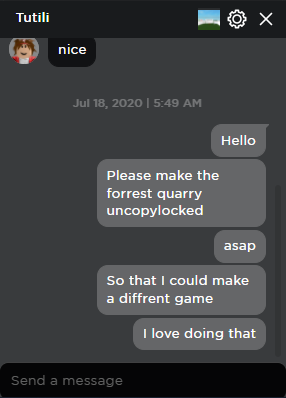

Example of a chat with a friend on the website.
Chat[]
Website chat will open up if users go to their friend's profile and click "Chat" or select their name in the chat box. Users can chat with their friends directly from the website/app.
Parties[]
Users are able to create a party with one or multiple users using the chat system. The party leader can pick and join a game, which forces all other members of the party to join in the same game together. This feature was originally removed in 2019 but was later brought back in late 2024.
Updates to the Friends System[]
Changes to Homepage Display[]
In the Summer of 2018, the Friends section on the Homepage was changed to only display the headshots of friends' avatars as thumbnails (before this change, it would show their entire bodies). Users can also see the game that their friends are currently playing underneath their avatar's thumbnail.
Friend Limit[]
Starting in October 2024, Roblox began the gradual process of changing the friends limit from 200 to 1,000.[3]
On February 4, 2015, Roblox made it so that any user can have up to 200 friends, rather than an unlimited amount like before. Everyone's friends before the update were converted into Followers. Additionally, Roblox converted any best friends into friends.[4] Many users were upset at this change, arguing that 200 was too low a number and should be increased.
Best Friends Removal[]
The Best Friends feature was added on July 30, 2009.[5] Originally, users could set 10 users to be their best friends. When a user was set as a best friend, users could see their status updates via the feed, which was originally on the profile. Sometime later, users could set more users as their best friends and see all friends and best friends' status updates. On October 16, 2014, Roblox announced that they will remove the best friends feature. Before the feature was removed, users were allowed to have up to 200 best friends.[6] Best friends were removed on February 4, 2015, along with the addition of a friend limit.[4]
Custom Name[]
In the summer of 2019, Roblox gave users the ability to add custom names to their friends. This previously unannounced feature allowed users to give their friends a nickname/personal description. These custom names can only be seen by the user that sets them. Despite this, any real names will still get censored by the word filter.
Trusted Friends[]
On July 17, 2025, Trusted Friends (debuted as "Trusted Connections") were added. For users to be Trusted Friends, users would have to be age verified and not already be friends with the user. Then, a user would have to share their QR code with the other user. (Only available on the mobile/desktop app, not available on the website.) The user sharing the QR code must stay on the page with the QR code until the other user has scanned it and sent them a friend request in order for them to become a trusted friend. Users who are trusted friends have access to communicating with each other with voice chat in parties, and a less restrictive chat filter through the website chat. Additionally, with the addition of age verification, trusted friends can freely chat with each other within games regardless of their age groups.
Friends with Deleted Accounts[]
If a friend's avatar card is grayed out, it means that the user has been banned; their account has been terminated or deleted. Clicking on their avatar card will be disabled, but their display name will have a menu button next to it. If you click on the menu button, a drop-down menu will appear with only one option on it, saying "Unfriend".
At some point in 2021, their avatar cards were rescripted so that they not only appear grayed out but also have a label on them saying "Inactive".
At some point in 2025, their avatar cards were rescripted again to say "Account Deleted" on their avatar cards as their display name and on their username label to prevent users from finding out who the account belongs to. However, the label saying "Inactive" would still be there.


.png "Account Deleted friend (Roblox app).png (35 KB)")

Trivia[]
This section is a trivia section. Please relocate any relevant information into other sections of the article.
- There are multiple patents related to the Friends feature:
- US20110307807A1, which relates to creating a Party to chat with friends and invite them to games.
- US10728701B1, which relates to a method of establishing friendships with Roblox users who are physically near another Roblox user in real life by making request-based "proximity chirps" through the user's device(s).
- US20170296929A1, which relates to adding friends to private server whitelists.
- US20170291111A1, which relates to creating a Party with multiple users to launch the Roblox player to join the chat leader in games.
- US9919220B2, which relates to a system that prioritizes connecting users to video game servers that their friends are in.
- It used to be possible to view the friends pages of terminated users; however, this has since changed, and attempting to view the friends page of a terminated user will now result in a 404.
- If users delete all of their friends, the user's Friendship Badge will remain on their profile.
- In April 2025, Roblox removed the ability for users to view the friends lists of users who are under 13, along with all UK-based users, via the website and apps. However, as of September 11, 2025, these could still be viewed via the public API, though other UK-based and under-13 accounts were hidden. The ability to view the Friends list with the public API was patched in January 2026.
- Users can still be Friends with a banned user. However, to not fill up their friend's list, these banned accounts can be removed, as that is the only option.
- There is a counterpart to Friends called "Trusted friends", where users can "trust" a Friend. Doing so can unlock special benefits exclusive to them. Some of those being:
- Having a less restrictive chat filter on the website Chat.
- Trusted Friends have a custom name tag beside their display name in-game. That being the word "Trusted" inside an almost transparent white box.
- Trusted Friends have the ability to still chat with each other, no matter what age group they are in (this was a feature added in early February 2026, possibly. Before, they couldn't be able to do this.).
- Friends was renamed to Connections somewhere in mid 2025, before being renamed friends somewhere in late March or early April 2026.
References[]
- ↑ Roblox (2025, January 14). "Updating Friends API & Deprecating IsOnline property from GetFriendsAsync". From DevForum. Accessed January 14, 2025. Archived from the original on January 15, 2025.
- ↑ David.Baszucki (2006, September 29). ROBLOX v0.3.218. Accessed February 25, 2025. Archived from the original on February 25, 2025.
- ↑ Bloxy News [@Bloxy_News] (2024, September 8). "The #Roblox friend limit has increased from 200 users to 1,000 users! The amount of users you can block has also been increased to 1,000." [Tweet]. Twitter.
- ↑ 4.0 4.1 Sorcus (2015, February 4). "Friends and Followers Makes ROBLOX More Social, and Even More Fun". From Roblox Blog. Archived from the original on September 21, 2024.
- ↑ roblosam (2009, July 30). "Status Updates, Best Friends, and Feeds, oh my". From Roblox Blog. Archived from the original on September 21, 2024.
- ↑ Sorcus (2014, October 16). "Ushering in the New ROBLOX Social Experience". From Roblox Blog. Archived from the original on September 21, 2024.
| Corporate | |||||||||||||||||||
|---|---|---|---|---|---|---|---|---|---|---|---|---|---|---|---|---|---|---|---|
| Software |
| ||||||||||||||||||
| History | |||||||||||||||||||
| Website |
Account settings · Avatar Editor · Banner · Character · Comments · Community · Friends · Discover · Error · Inventory · Messages · My Feed · My Transactions · Notify · Personal Server · Private server · Profile · Roblox badge · Verified Badge · Friends chat · Party · Website Background | ||||||||||||||||||
| Currency | |||||||||||||||||||
| Membership | |||||||||||||||||||
| Merchandise | |||||||||||||||||||
| |||||||||||||||||||
| |||||||||||||||||||
| |||||||||||||||||||
| Italicized links indicate pages with a discontinued subject. | |||||||||||||||||||