The Roblox Developer App was a mobile app released on the iOS App Store on September 24, 2014. The app allowed the user to pair their device to Roblox Studio so that they could use it as a testing device when using Server-Client mode. Roblox had stated in their September BLOXcast that an Android version would only be available when they were satisfied with the iOS version.
Eventually, the Roblox Developer mobile app was removed from the App Store due to not being functional alongside confusion for users who were looking to download the Roblox mobile app[1]. Roblox had stated the intention of eventually bringing it back[1], though this statement was made in 2017 and a Roblox Developer mobile app has yet to release nor any signs that it may be in development.
Menu Overview
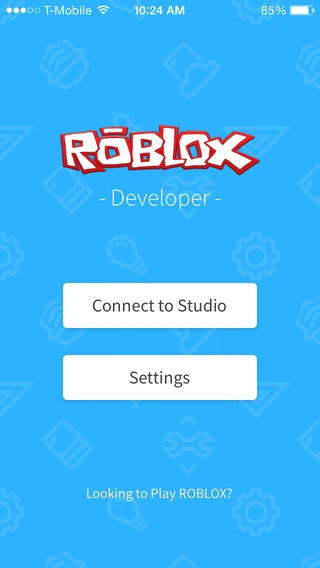

The main menu of the Roblox Developer app on iOS. (2014)
When you start the app, there is some text at the bottom of the screen which asks the user, "Looking to play Roblox?". There are 2 main buttons to choose from in the app, these buttons are:
- Connect to Studio - Connects the device to Roblox Studio as a client. You must pair the device in Settings and start a server using Server-Client mode before the device can connect to Studio.
- Settings - Allows you to choose what stats to display when testing and allows you to pair your device to Roblox Studio using a 4-digit pin given in the Roblox Studio window on your computer. The section below goes into detail of each setting in the menu.
Settings
The settings screen has limited options to choose from, contained in two categories: Stats display and connection. The settings are shown below.
Stats Display
- None - The default display of stats. Shows nothing and makes the experience of testing the same as playing a game normally on Roblox Mobile.
- FPS - Shows the amount of FPS the device is playing the game at.
- Summary - Shows a summary of some stats.
- Physics - Shows the stats of the physics in the current game.
- PhysicsAndOwner - Shows the stats of the physics and shows network owners of unanchored parts.
Connection
- Connect to New Studio - Guides you through pairing your device to Roblox Studio so you can use the Connect to Studio button on the main menu.
Trivia
This section is a trivia section. Please relocate any relevant information into other sections of the article.
- On newer versions of iOS, if you turn on the night mode, the app icon white background will turn to black, including the R icon (see 4th image)
External links
Testing video by darthskrill (2014)
Gallery


References
| Corporate | |||||||||||||||||||
|---|---|---|---|---|---|---|---|---|---|---|---|---|---|---|---|---|---|---|---|
| Software |
Engine · Guilded · Hyperion · Luobu · Minimum system requirements · Player · Studio · VN · Developer · Knights & Kingdoms · Survive the Disasters · Hang Out in a Disco and Chat | ||||||||||||||||||
| History | |||||||||||||||||||
| Website |
Account settings · Avatar Editor · Banner · Character · Comments · Community · Friends · Discover · Error · Inventory · Messages · My Feed · My Transactions · Notify · Personal Server · Private server · Profile · Roblox badge · Verified Badge · Friends chat · Party · Website Background | ||||||||||||||||||
| Currency | |||||||||||||||||||
| Membership | |||||||||||||||||||
| Merchandise | |||||||||||||||||||
| |||||||||||||||||||
| |||||||||||||||||||
| |||||||||||||||||||
| Italicized links indicate pages with a discontinued subject. | |||||||||||||||||||