
The default icon for plugins in the Creator Store.
A plugin is a type of script that is only executed within Roblox Studio that allow for additional features and functionality within editing. Plugins have a thread identity of 5 ("PluginSecurity" permission), allowing more access to the engine's API, and are used to add additional functionality. Plugins have access to the plugin reference to the 
 Plugin object, unlike other types of script. Script files in the "plugins" folder are automatically run as plugins whenever the data model loads.
Plugins are also an asset type and can be seen as a category on the Creator Store. Plugin assets are not necessarily scripts themselves; they are instead instance data which contain scripts that will be executed as plugins. Like script files, they are automatically executed, as long as they are enabled. While plugins can be sold for free, ID/phone-verified users can monetize any of their plugins for US Dollars[1] (formerly Robux[2]). Users can take or purchase available plugin assets and install them in Roblox Studio. The Plugin Management window allows disabling or enabling installed plugins, as well as updating or removing them.
Although useful, some plugins are malicious, which may insert viruses or backdoors designed for exploits without the user knowing. On the Creator Store, these plugins are often copies of other popular plugins with malicious code added and use the same name/description/icon to trick users.
History


The former default icon for plugin assets in the Library.
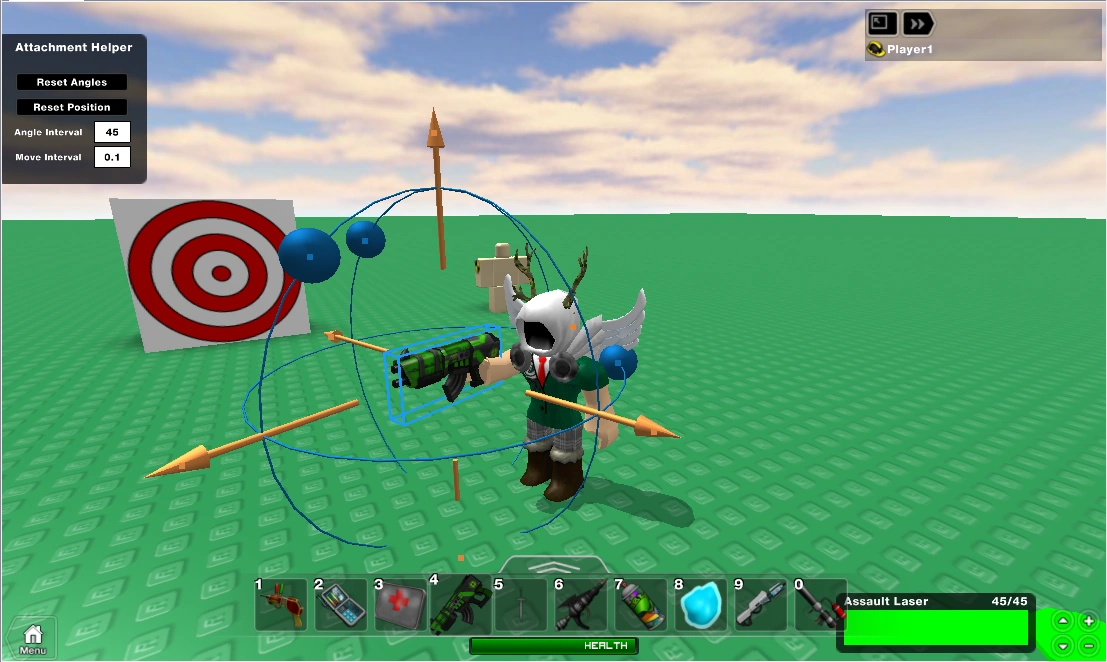

An example of an 
 attachment plugin from Stickmasterluke
  Stickmasterluke is a notable creator or influencer verified by Roblox Corporation. Learn more., dated 2012.
On August 11, 2011, Roblox introduced plugins, along with the defunct time slider plugin provided by default then later removed.[3]
On January 16, 2014, Roblox brought the plugin asset type onto the main website after being only seen in Studio, along with allowing for them to be browsed and created through the website with the RBXM file extension.[4]
On December 11, 2019,[2] the ability to charge Robux for plugins was added for select developers, which was planned to eventually expand to all users. The price floor for paid plugins was increased to 100 Robux on August 11, 2022, meeting mixed reception.[5]
On April 10th, 2024, the payment system of plugins was changed from Robux to real-world currency, allowing for creators to directly profit from sales rather than going through a 30% fee and DevEx.[1] Paid plugins that didn't already have a USD value set were temporarily privated. This meant most of the plugins were initially made exclusive to USA users after this change. If a creator under 18 years old wanted to put a price on their plugins, they now needed to get approval from a parent/guardian.
Execution
Similar to how scripts work, whenever a place is loaded in Roblox Studio, plugins are automatically run through installed and enabled Plugin assets or through files in the "plugins" folder which are known as local plugins. If the place is loaded in runtime mode, plugins also have a separate runtime environment within the runtime place, which is automatically terminated as soon as the place is stopped. The keyword plugin, which is a reference to the Plugin object, is accessible for plugins, unlike other code. For other code such as code run in the command bar, PluginManager():CreatePlugin() can be used.
Caveats

 LocalScripts are not executed.
- If a script is added at runtime to the plugin, or if a script becomes enabled it will not be run as part of the plugin. Only scripts that are present and enabled at load time will be run.
Persistence API
The Plugin object has two methods for managing data that persists even if Roblox Studio is closed; one for setting values and one for retrieving the values:
- Plugin:SetSetting() stores the value for later use under the key. Instances and Lua functions will not be stored correctly. Simpler types (like tables, strings, numbers, etc.) are preferable. Key only needs to be unique per plugin, with the caveat that all local RBXM files in the plugins folder will share one settings namespace; once the plugin is published through the website, it will have private storage.
- Plugin:GetSetting() retrieves a previously stored value, or
nilif no key is found.
Publishing plugins
The website allows uploading plugins just like any other model. To do this from Studio:
- Select the contents of your plugin.
- Right-click
- Select "Publish as Plugin..."
Technical details
- The
pluginglobal variable (likescriptin scripts) will be added to plugins using the new file format. You should only use thisPlugin object, and should no longer use PluginManager():CreatePlugin()if you are using the new model file format.- Note: the model will not be saved between runs. Use the new plugin persistence API to store data between sessions.
- Plugin:GetStudioUserId() returns studio user's userID if they are logged in, otherwise returns 0.
References
- ↑ 1.0 1.1 crayzdesi4 (2024, April 10). "Creator Store: Buy and Sell Plug-Ins with Real-World Currency". From DevForum. Archived from the original on November 22, 2024.
- ↑ 2.0 2.1 RoxyBloxyy (2019, December 4). "Introducing: Plugin Marketplace!". From DevForum. Archived from the original on February 8, 2023.
- ↑ Shedletsky, John (2011, August 12). "ROBLOX Plugins: Power to Scripters". From Roblox Blog. Accessed January 18, 2026. Archived from the original on July 7, 2016.
- ↑ Rugdumph, Lord (2014, January 16). "Using Plugins Just Got 10x Easier". From Roblox Blog. Archived from the original on May 21, 2025.
- ↑ crayzdesi4 (2022, August 11). "Update to the Plugin Marketplace". From DevForum. Archived from the original on January 20, 2023.
| Programming |
| ||||||
|---|---|---|---|---|---|---|---|
| Design | |||||||
| Assets | |||||||
| Tools | |||||||
| Monetization | |||||||
| Analytics | |||||||
| Advertising | |||||||
| Resources | |||||||
| Places (games) | |||||||||||||||||||||||||
|---|---|---|---|---|---|---|---|---|---|---|---|---|---|---|---|---|---|---|---|---|---|---|---|---|---|
| Marketplace (avatar shop) |
| ||||||||||||||||||||||||
| Creator Marketplace (library) |
| ||||||||||||||||||||||||